I choose continue by projection from the right-click menu and... voila:

Our plane all ready to paint up. Kinda reminds me of the instructions for a model plane construction kit.
If we close this window we're prompted to save the texture "template" and the UV coordinates, but before we do, lets look at the (right-click-menu) draw options screen:
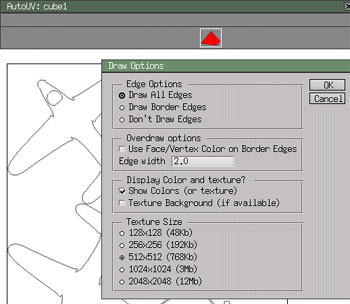
Drawing just the outlines (as shown above) doesn't matter to me since I'll be painting right over the top. But the Texture size might be of interest. It's one of those size vs detail trade-offs that I'll let you decide for yourself. If this plane was going to be seen up close with a lot of detail then I'd probably choose a larger texture map than the standard 512x512.
If you selected the "apply texture" from the right-click menu, then your model will show the grey lines of the texture and you'll be ready to export. OK, close the window, choosing to save the UV coordinates and texture.
AoI imports in .obj format so export your model and we'll move on to poseray.
<<-page 3 | page 5 ->>